Path Schema Guide
Path Schemas help you find how any two entities (events or objects) are connected in a loaded OCEL, even when they share no direct relationship and are only linked through chains of intermediate entities.
For example: how long does it take from place order to package delivered, and through which chains of intermediate entities are the two connected?
A path schema is a type-level path such as Order -[places]-> Item -[part_of]-> Delivery.
OCPQ enumerates the schemas between a chosen source and target type and ranks them by metrics like coverage and selectivity, so meaningful connections stand out from noise.
You can then open any schema as a regular OCPQ query to analyze it further.
Open it from Path Schemas in the sidebar. An OCEL must be loaded first.
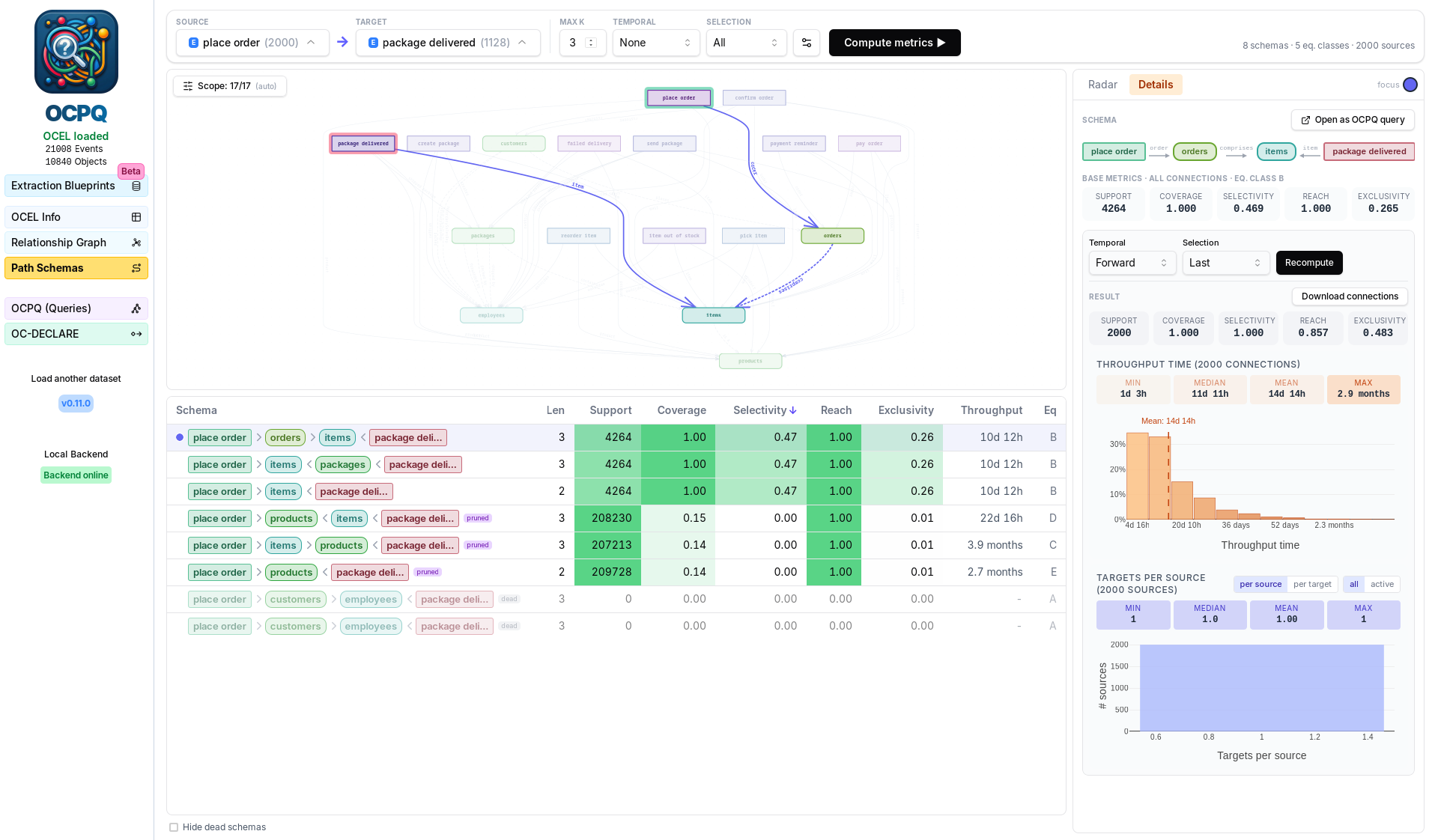
Pick a source and target type
The top toolbar has a Source and a Target picker, listing every event and object type with its instance count.
You can also click nodes directly in the type graph below: the first click sets the source, the second sets the target.
In the screenshot above, the source is the place order event and the target is the package delivered event.
As soon as both are set, OCPQ enumerates all type-level path schemas between them (up to the chosen length). This step is fast and runs automatically; no metrics are computed yet.
Tune enumeration (optional)
- Max k - maximum path length (the number of steps a schema may have).
- Scope - the type-filter control on the graph limits which intermediate types a path may pass through. Source and target are always allowed. By default the scope is chosen automatically (all types for small logs, the connected top types for large ones), and the controls let you widen or narrow it. A tighter scope means fewer, more relevant schemas and faster computation.
Compute metrics
Click Compute metrics. This traverses the actual instances and fills the table. Three settings shape how connections are counted:
- Temporal - None (ignore time), Forward (target event must occur after the source), or Bounded (target must occur within a configurable time window).
- Selection - when a source reaches several target events, which to keep: All, First, Last, or Closest (closest in time).
- Pruning (advanced) - a selectivity threshold; schemas provably below it are dropped early and marked pruned. Setting it to 0 disables pruning.
Read the results
Each row is a schema with these metrics (all sortable):
- Support - number of distinct (source, target) pairs connected.
- Coverage - fraction of source instances that reach at least one target.
- Selectivity - inverse average fan-out (1 / avg targets per connected source). High means each source maps to few targets, i.e. the schema is discriminating.
- Reach - fraction of target instances that are reached.
- Exclusivity - inverse average fan-in. High means each target is reached by few sources.
- Throughput - mean time between source and target (event-to-event schemas).
- Eq - connection-equivalence class; schemas that produce the exact same set of connections share a class.
Schemas with no connections are marked dead (toggle Hide dead schemas to remove them).
Inspect and reuse a schema
Click a row to open it in the right-hand dock:
- Radar compares the selected schemas across all metrics at once.
- Details shows the path diagram, base metrics, and lets you recompute under a different Temporal/Selection setting. It also plots the throughput histogram and the per-source / per-target connection distributions. Download connections exports the connection list as CSV, and Open as OCPQ query turns the schema into an editable binding-box query in the constraint editor.